
Closing Out a Project Right: Archiving, Invoicing, and Your Flight History

Project closeout is where flight records either get preserved properly or disappear into a tangle of old spreadsheets. It’s also where billing discrepancies, incomplete submissions, and missing documentation tend to surface — after the deadline has passed and the client has moved on.

A clean closeout process protects your historical data, finalizes billing, and resets your system for the next project without carrying forward any confusion from the last one.

Invoicing Before You Archive

Before closing out a project, every site needs an invoice entry and a final billing status. FlightDeck’s Invoice Management tool presents each completed site with its Site ID, pilot pay, invoice amount, and current status — Flown and Complete — so you can enter final billing numbers and reconcile against your actual deliverables.

If you’re working with Salesforce for client billing, the Invoicing tool supports a direct Salesforce import that maps your completed site data to the appropriate billing records. The match runs against your project data and updates invoice fields from the import file, which eliminates the manual cross-referencing between FlightDeck and your billing system.

Completing billing before archiving matters because the archived data is your permanent record. Whatever numbers are in the working file when you archive are what go into your historical flight record.

The Combine and Archive Process

FlightDeck’s Combine and Archive tool runs a seven-step process that merges your completed project into the master AllFlightData.xlsx record and resets the working environment for the next project.

The steps run in sequence: first, any blocking applications — including LiveView_DATA, which holds the working data file open — are closed. Excel is closed after a confirmation prompt. Then the current working files are moved to a Combine staging folder, merged with the existing AllFlightData record, and the merged file is saved both as the new AllFlightData.xlsx and copied to the Archive folder as a backup. Temporary files are deleted. Working file templates are reset to blank.

The tool shows progress through each step as it runs, with a checkmark when each completes. The whole process takes under a minute for most project sizes.

What Gets Preserved

The archived AllFlightData.xlsx is your cumulative flight history — every project, merged in sequence. Over time this becomes the record of every site you’ve flown, every authorization you held, every invoice you processed. It’s the data that answers questions like “did we fly this tower before?”, “what was our pilot pay rate for that carrier last year?”, and “how many sites did we complete in Q3?”

That historical record has real business value if it’s maintained consistently. It also provides documentation in the event of an audit, a dispute, or a compliance review — a complete flight history is materially different from a folder of old project files that have to be reconstructed manually.

Resetting for the Next Project

After the archive runs, FlightDeck resets the working templates to a clean state. The next project import starts from scratch — no residual data from the previous project, no risk of mixing completed sites with new ones.

This reset is part of why the Combine and Archive tool asks for confirmation before running. The action is irreversible: once the working files are deleted and the templates reset, the previous project’s working data is gone from the active environment. It lives in the archive, but it’s no longer in the working files.

The confirmation prompt makes that explicit. The progress display makes the steps visible. The end result is a clean system and a complete historical record — which is what project closeout should produce.


Try FlightDeck free for 30 days.

Scaling Your UAS Business: From Solo Operator to Multi-Pilot Team

Two commercial drone pilots reviewing a job site map together before a multi-aircraft UAS inspection mission

The demand for commercial UAS services has outpaced the supply of organized, reliable operators in most specialized markets. Telecommunications inspection, power line survey, agricultural data collection — these markets are awarding larger contracts to operators who can demonstrate they can handle volume, consistency, and multi-site coordination at scale.

The problem is that most solo operators who try to scale hit the same wall: their operational systems — or lack thereof — don’t extend to a team. What worked for one pilot in a spreadsheet doesn’t work for four pilots across three states.

Here’s the operational infrastructure you need to build before you scale, not after.

Standardized Procedures Come First

The most common failure mode in scaling a UAS operation is adding people before adding systems. The result: every pilot does things slightly differently, data quality varies by operator, clients notice the inconsistency, and the reputation of the operation suffers from work that isn’t uniformly professional.

Before you bring on a second pilot, every core operational procedure needs to be documented, tested, and standardized. Pre-flight inspection. Site survey. Launch and recovery. Data capture. Upload and delivery. Post-flight documentation. Every step that happens on a job needs a defined standard that any qualified pilot can execute consistently.

This is your operations manual. It’s the foundation on which you build a scalable team.

Fleet Management and Equipment Tracking

A solo operation with one aircraft is relatively simple to track. A three-pilot operation with multiple aircraft, a library of batteries, and payload options by job type requires systematic fleet management.

Every aircraft needs documented maintenance history, current registration, and flight hour tracking. Every battery needs cycle count monitoring. When equipment goes out with a field team, you need to know which aircraft and which batteries went where, and what condition they came back in.

FlightDeck’s Drone Maintenance Log tracks maintenance events, battery cycles, motor hours, and repair history by serial number. Two editions are available — solo operator and fleet management — covering both stages of your operation’s growth.

Coordinating Multi-Pilot Schedules and Site Assignments

With multiple pilots, site assignment and scheduling become a coordination challenge. Who’s flying which sites on which days? Are authorization windows aligned with the pilot who’s actually going to that site? When sites get rescheduled due to weather, which pilot’s schedule is affected?

FlightDeck’s Forecast Scheduler reviews pending sites across the entire project and suggests an efficient fly schedule based on weather windows, site proximity, and project priority. Instead of manually balancing a multi-pilot calendar, you get a data-driven suggestion that accounts for conditions and location clustering.

The shared Google Maps pin layer — generated automatically by the 3-Phase Update — gives every pilot on the team a current view of project status without anyone needing to call in for a status update.

Data Consistency Across Multiple Pilots

One of the hardest quality control challenges when scaling is ensuring that data delivered by Pilot A meets the same standard as data delivered by Pilot B. Different camera settings, different flight patterns, different upload habits — all of these create inconsistency that clients notice.

FlightDeck’s QC Uploader applies the same automated EXIF quality checks regardless of which pilot captured the data. Images below F/4 aperture or above ISO 400 are flagged before upload proceeds, for every pilot on every job. The quality standard is enforced by the tool, not by trusting individual compliance.

Client Reporting at Scale

Enterprise clients on large projects want progress updates without having to ask for them. FlightDeck’s TX Daily Report generates formatted daily operations reports from the project database — publishable on a schedule, even hourly, without interrupting flight operations. Supervisors and clients see current status automatically.

The Confirm Progress dashboard gives team leads a color-coded delivery status view across every flown site: what’s been uploaded, what forms have been submitted, what’s fully complete and what’s pending. Managing a team’s delivery pipeline from one screen, without chasing individual pilots for status.

The Financial Case for Building Systems Before Scaling

Building operational infrastructure before scaling feels like overhead. It is — but it’s the overhead that determines whether scaling creates profit or just creates more problems at larger scale.

Operators with documented procedures, systematic fleet management, and consistent data delivery command premium rates from enterprise clients and win repeat contracts. Operators who scale on informal systems tend to win more work than they can execute reliably, damage client relationships, and find that growth made profitability harder, not easier.

Build the infrastructure first. Then grow into it.

Download FlightDeck free for 30 days and build the operational foundation your business needs — whether you’re flying solo today or building toward a fleet. The $250 lifetime license is the last operations software investment you’ll make.

UAS Safety Culture: Building a Safety-First Operation as a Solo or Small Team

Safety culture is a term most commercial UAS pilots associate with large organizations — airlines, military units, corporate flight departments with dedicated safety officers and formal SMS programs. It sounds like something that doesn’t apply to the solo Part 107 operator flying inspection contracts in three states.

That’s a misconception that has ended more than a few commercial UAS careers.

Safety culture isn’t a program. It’s a set of habits, standards, and values that shape every operational decision you make — from how you conduct a pre-flight inspection to whether you fly in marginal conditions because the schedule says you should. And it matters for solo operators and small teams as much as it does for anyone else.

What Safety Culture Actually Means

A genuine safety culture has three characteristics:

Reported. When something goes wrong — or almost goes wrong — it gets documented and discussed, not buried. In an organization, this means a non-punitive reporting system. As a solo operator, it means writing up your own close calls honestly and using them to improve your procedures.

Learned. Information from incidents — yours and others’ — feeds back into how you operate. The UAS industry generates incident data through ASRS reports, FAA enforcement records, and pilot communities. Operators who read and learn from that data don’t repeat the same mistakes.

Consistent. Standards are applied every time, not just when conditions make it easy. A pre-flight checklist completed on every flight — including the short, familiar one you’ve done 50 times before — is a safety culture behavior. Skipping it because “you know this site” is not.

The Hidden Cost of Low Safety Standards

Beyond the obvious risk of incidents, low safety standards carry a business cost that isn’t always visible until it matters. Enterprise clients — utilities, carriers, construction companies, insurance firms — increasingly evaluate UAS vendors on safety credentials before awarding contracts. They ask for operations manuals, safety records, incident history, and evidence of structured operational procedures.

A pilot who can demonstrate consistent, documented safe operations commands better rates and more stable enterprise contracts than one who can’t. Safety culture is a competitive advantage, not just a moral obligation.

Practical Safety Culture Habits for Solo Operators

Pre-flight, every time. No exceptions. No abbreviated versions for familiar sites. The checklist exists because familiar sites are where complacency lives.

Personal weather minimums, written down. Limits you’ve committed to in advance are the ones you’ll actually hold to when conditions are marginal and pressure to fly is high.

An honest post-flight debrief. Even a two-minute mental review — what went as planned, what didn’t, what would you change — builds the pattern recognition that makes you a safer operator over time. Write it down when something is worth noting.

Equipment that’s ready to fly before it needs to fly. Battery health checked regularly. Props inspected after every flight. Firmware current. Maintenance intervals tracked. You find equipment issues during maintenance, not during a mission.

Currency. If you haven’t flown in a while, practice before taking a client job. Motor skills and pattern recognition erode. Solo proficiency flights aren’t wasted time — they’re maintenance on your most important piece of equipment, which is you.

How FlightDeck Supports a Safety Culture

Safety culture requires documentation — the evidence that standards are being applied consistently. FlightDeck’s structured logging captures pre-flight completion, conditions, authorization status, anomalies, and post-flight notes in a local database attached to every mission record.

The Drone Maintenance Log tracks maintenance events, battery cycles, and repair history by aircraft serial number — exportable for insurance documentation and compliance records. The Airspace Checker ensures every site gets a proper authorization review before you fly, not after. The compliance documentation tools build the operational paper trail that enterprise clients and insurers require.

Safety culture produces the data. FlightDeck captures it.

Download the free 30-day trial and start building the operational record that proves your safety standards to clients, insurers, and the FAA — one documented flight at a time.

Building a UAS Operations Manual: Why Every Part 107 Pilot Needs One

Commercial drone pilot reviewing a printed UAS operations manual binder with standard operating procedures and emergency protocols

The FAA doesn’t require most Part 107 operators to maintain a formal operations manual. That’s the wrong reason not to have one.

A UAS operations manual is three things simultaneously: your operational bible (the definitive reference for how your operation works), your legal protection (documented evidence that you operate to defined standards), and your credibility document (what enterprise clients and insurers ask for before they’ll hire or cover you).

Here’s what a professional UAS operations manual contains and why each section matters.

Organizational Information

Who operates this UAS program. Contact information. Certificate numbers for all pilots. Your operating entity if separate from your personal certificate. Emergency contacts.

This section exists so that anyone — a client, an insurer, a responding authority — can quickly identify who is responsible for the operation and how to reach them.

Aircraft Inventory and Configuration

Every aircraft you operate should be documented: make, model, serial number, FAA registration number, payloads, maximum takeoff weight, operating limitations, and maintenance history reference. Configuration changes — adding a new payload, replacing a flight controller — should be logged.

This documentation is what your insurer uses when you file a claim and what the FAA reviews if your aircraft is involved in an incident.

Standard Operating Procedures

This is the heart of the manual. SOPs define how every type of operation your company conducts is performed — step by step, to the same standard, every time.

At minimum, SOPs should cover:

  • Pre-flight inspection procedure
  • Site survey procedure
  • Launch and recovery procedure
  • In-flight monitoring protocol
  • Abort criteria and emergency procedures
  • Post-flight documentation procedure
  • Battery management and storage
  • Equipment maintenance schedule

SOPs are living documents. When you encounter a situation your SOP didn’t cover, you update the SOP. When you find a better way to do something, you update the SOP. The manual reflects your current best practice, always.

Emergency Procedures

What happens when the link fails? When the aircraft starts to fly-away? When there’s a medical emergency on site? When the aircraft goes into a water obstacle? When there’s an airspace intrusion?

Emergency procedures must be defined in advance, briefed before every operation, and practiced. The time to figure out what you’d do in a fly-away scenario is not during a fly-away.

Crew Roles and Responsibilities

Define every position in your operation: Remote Pilot in Command, Visual Observer, Crew Coordinator, Ground Safety Officer. Who has authority to call a stop. How communication flows. What each person monitors and reports.

For solo operators, this section may seem unnecessary — but when you add a second person to any operation, undefined roles are a safety hazard.

Airspace Authorization Procedures

How does your operation obtain, document, and manage airspace authorizations? What’s the process for LAANC requests? For COA applications? For TFR checks? This section should reference your specific tools and workflows.

Incident and Accident Response

Exactly what to do, in what order, if something goes wrong. NTSB reporting thresholds and timeline. Insurer notification procedure. Client notification procedure. Documentation requirements. Evidence preservation.

How FlightDeck Supports Your Operations Manual

FlightDeck operationalizes your SOPs by providing the structured data capture, airspace analysis, and documentation tools that your manual describes. Your pre-flight checklist procedure references FlightDeck’s logging workflow. Your airspace authorization SOP references the Airspace Checker and LAANC Tracker. Your post-flight documentation SOP references the flight record and report generation.

The manual defines the standard. FlightDeck executes it.

FlightDeck’s Compliance Manager also generates FAA-compliant COA application narrative content — the Operations Description, CONOPS, Emergency Procedures, and waiver guidance sections that form the core of a nationwide blanket COA application. Much of that content can be adapted directly into your operations manual.

Download the free 30-day trial and start building the operational infrastructure that makes your UAS business enterprise-ready.

Part 107 Renewal Is Coming — Is Your Operational History Ready?

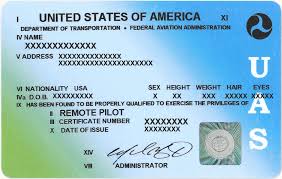
FAA Part 107 drone pilot license card next to organized UAS flight logs and operational history documentation

Part 107 recurrent training and knowledge testing requirements mean that staying current as a commercial drone pilot is an ongoing obligation — not a one-time event. And while the FAA doesn’t currently require you to submit flight logs at renewal, your operational history matters more than pilots often realize.

Why Your Flight History Matters at Renewal

Your flight records tell the story of your professional development. When you’re bidding on contracts with larger clients, responding to RFPs from enterprise accounts, or applying for waivers that require demonstrated operational experience, your documented flight history is your evidence.

“I’ve been flying professionally for five years” is a statement. A structured record of 400+ logged commercial missions is proof.

Waiver Applications and Operational Records

Many Part 107 waivers — beyond visual line of sight, operations over people, night operations — require applicants to demonstrate relevant operational experience. The FAA’s waiver application process asks you to describe your mitigations and experience. Pilots with clean, detailed operational records are better positioned to make that case.

What to Have Organized Before Your Knowledge Test

Use your recurrency period as a trigger to audit your records:

  • Are all past missions logged with complete data?
  • Are your airspace authorizations filed and accessible?
  • Are your aircraft maintenance and inspection records current?
  • Is your certificate information and medical (if applicable) up to date?

The Difference Between Pilots Who Scale and Those Who Don’t

The commercial UAS operators who grow their businesses from solo gigs into real operations share a common trait: they treat record-keeping as a core function, not an afterthought. Clean records enable audits, support insurance claims, back up waiver applications, and signal professionalism to enterprise clients.

FlightDeck was built for exactly this — structured, local, field-ready flight operations management. Try it free for 30 days.

How to Price Your Commercial Drone Services (And Stop Leaving Money on the Table)

Commercial drone pilot reviewing service pricing on a laptop at a desk with a DJI drone and invoice documents nearby

Pricing is where most solo commercial drone operators undercharge — and keep undercharging because they don’t have the data to know what their time and equipment actually cost.

Here’s a framework for pricing commercial UAS services that reflects real operational costs and supports a sustainable business.

Start With Your Actual Costs

Before you can price a job, you need to know what it costs to fly it. Most pilots dramatically underestimate their real cost per flight hour because they don’t account for all the inputs:

  • Equipment depreciation — your drone isn’t lasting forever. What’s the cost per flight hour over its useful life?
  • Battery replacement — LiPo batteries have a finite cycle count. What’s the per-cycle cost?
  • Insurance — your annual hull and liability premium divided by your annual flight hours
  • Maintenance and repairs — motors, props, sensors, crash repairs
  • Software and tools — operations software, editing software, cloud storage
  • Travel time and mileage — the flight is rarely the most time-consuming part of the job
  • Admin time — planning, filing, reporting, invoicing

When you add all of this up, you often find that your effective hourly cost is significantly higher than your flight rate implies.

Market Rate vs. Value Rate

There are two ways to price commercial drone services:

Market rate pricing means charging what the market charges. This is a race to the bottom in competitive markets and leaves value on the table in specialized markets.

Value-based pricing means charging what the deliverable is worth to the client. A 2-hour roof inspection that saves an insurance company $50,000 in manual inspection costs is worth far more than $200. A real estate shoot that helps sell a $2M property faster is worth more than the going rate for photography.

The more specialized your operation — infrastructure, agriculture, public safety, survey — the more leverage you have on value-based pricing.

Building a Pricing Structure

A clean pricing structure for a solo commercial operator typically includes:

  • Base day rate — your minimum charge for any job, covering travel, setup, and a standard flight block
  • Hourly flight rate — for jobs that extend beyond your base block
  • Deliverable rate — for edited video, processed orthomosaic, inspection report, etc.
  • Travel surcharge — for jobs beyond your standard radius
  • Specialized equipment rate — for thermal, multispectral, LiDAR, or other sensor-specific missions
  • Rush rate — for jobs that require prioritization or short-notice mobilization

Tracking What You Earn and What It Costs

The pilots who consistently price well are the ones who track their actual job costs against their rates. Over time, you build a picture of which job types are most profitable, which clients require the most overhead, and where your pricing needs adjustment.

This is exactly what an integrated operations and invoicing platform does for you. FlightDeck and WiseSkys.com work together to give you the complete picture — mission data alongside billing data.

Download the free 30-day trial and start building the operational data that makes better pricing possible.