Nearest Airport, Nearest Hospital: The Situational Awareness Data Every Pre-Flight Needs

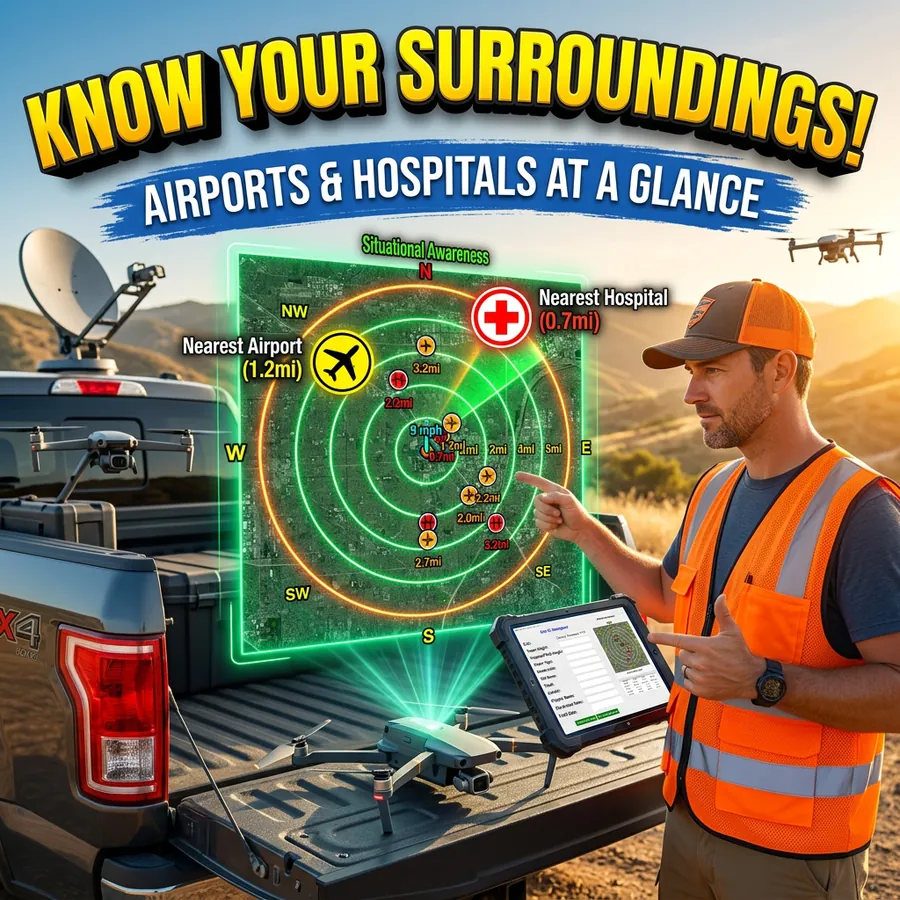
FlightDeck software displaying airport and hospital proximity data on a map for a commercial UAS job site

Most Part 107 pilots know their airspace classification before wheels up. Fewer know the distance and bearing to the nearest airport — or the nearest hospital. Both numbers matter, and both require more than a quick glance at a map to calculate accurately for a hundred sites at once.

FlightDeck calculates and records both automatically for every site in your project, stored directly in your working data file so the information is always there when you need it.

Why Distance to the Nearest Airport Matters

Airspace classification tells you whether you need authorization. Distance and bearing to the airport gives you the operational picture — which direction manned traffic is likely approaching from, how close you are to approach and departure corridors, and what situational awareness your crew needs during the operation.

It also matters for your documentation. COA narratives, pre-flight checklists, and formal risk assessments typically require nearest airport information. Having it automatically populated across your entire project means you’re not manually looking up each site the night before.

FlightDeck stores two entries for each site: the nearest airport and the second-nearest airport. Each entry includes the airport name, ICAO identifier, airport type, airspace class, distance in nautical miles, and cardinal bearing. All of this is calculated using Haversine geometry — the same spherical distance formula used in aviation navigation — applied against a locally stored airport database.

Why Distance to the Nearest Hospital Matters

UAS incident response planning requires knowing where the nearest medical facility is. For inspection work in rural corridors — tower lines, pipelines, agricultural parcels — that answer isn’t always obvious, and it changes with every site.

FlightDeck records the nearest hospital and second-nearest hospital for each site, with the same distance and bearing format as the airport data. On a 200-site project spread across three states, that’s 200 hospital lookups that don’t require manual research.

This data supports your pre-flight risk assessment and is available in the same row as your airspace classification, weather, and authorization status — all in one place when you’re planning the next day’s work.

How It’s Calculated

All distance and bearing calculations use Haversine geometry applied to latitude and longitude coordinates from your site list. The airport and hospital databases are stored locally, so the lookup runs whether or not you have an internet connection.

When a site already has nearest-airport data on file, FlightDeck reads from a SituationalAwareness cache to avoid redundant calculations on re-runs. New sites and any sites missing the data are calculated fresh during the 3-phase update.

The bearing is expressed as a cardinal direction — N, NE, SW, and so on — alongside the nautical mile distance, which is what you want for communicating airspace proximity in plain language.

What This Looks Like in Practice

Before a week-long tower inspection campaign, you run the FlightDeck 3-Phase Update. By the time it finishes, every site in your project has its nearest airport and hospital populated — the distance, the direction, and the identifier. Your pre-flight checklist for each site has the information without a separate research step.

When a client or project manager asks how close Site 47 is to the nearest controlled field, you have the answer in your spreadsheet, not from memory or a map lookup.

When you’re writing a COA narrative for a controlled-airspace site, the nearest airport data is already available. When you’re doing site-by-site risk assessment, hospital proximity is part of the same dataset.

The situational awareness data FlightDeck calculates is the kind of information that takes five minutes per site to look up manually — and zero minutes per site when it’s done automatically across your entire project.

FlightDeck’s situational awareness calculations are included in every license tier. Try it free for 30 days.


How FlightDeck’s 3-Phase Update Turns Raw Site Data Into a Mission-Ready Project

FlightDeck software showing the 3-phase site update workflow with geocoded site data, weather overlay, and mapping tools

One of the most time-consuming parts of managing a large commercial UAS project isn’t the flying — it’s the daily overhead of keeping your site list current. Geocoding new addresses. Pulling weather for 80 remaining sites. Generating a map your crew can actually use in the field. Doing it all again the next morning because conditions changed overnight.

FlightDeck’s 3-Phase Update collapses that workflow into a single click. Here’s exactly what it does and why it matters for professional UAS operations.

What the 3-Phase Update Is

The 3-Phase Update is the core processing engine of FlightDeck. It runs against your master project data file — the central record containing every site in your current project — and executes three sequential operations automatically.

You click run. FlightDeck does the rest.

Phase 1: Geocode

Every site in your project needs accurate GPS coordinates to function in any downstream workflow: airspace checking, weather retrieval, map generation, KML export. When you import sites from a client spreadsheet, many will have only a street address — or sometimes just a Site ID and a tower type. Geocoding converts those addresses into precise coordinates.

FlightDeck reads every site that lacks confirmed GPS coordinates and sends the address field to the OpenCage Geocoding API. The resulting latitude/longitude is written directly back to your master record. New sites added from a project import are geocoded and ready to fly within seconds of the update completing.

The system is smart about what it processes: existing complete records are skipped. Only new or incomplete entries are touched, so running the update multiple times per day doesn’t duplicate work or overwrite good data.

Phase 2: Weather

For every site scheduled but not yet flown, FlightDeck queries OpenWeatherMap and retrieves current conditions plus a 5-day forecast. Seven data points per site, per day:

  • Temperature
  • Wind speed and gusts
  • Wind direction
  • Cloud cover and sky conditions
  • Visibility
  • Precipitation probability

All of this is written to your master record automatically. Your entire project’s weather picture updates in one pass.

The color-coded forecast display gives you the field-ready view immediately: green dot means clear and favorable, red means rain, blue means snow or ice, gray means overcast. At a glance, across every remaining site, you see which days and which locations are flyable — before you brief your crew, before you load the trucks, before anyone drives anywhere.

Phase 3: Google Maps Report

The final phase generates a shareable Google Maps pin layer showing every site in your project, color-coded by flight status:

  • Scheduled but not flown
  • Flown and awaiting upload
  • Uploaded and complete
  • Flagged or problematic

The output is a formatted file you import as a layer into Google My Maps. Share the link with your crew chief, your project manager, or your client. Anyone with the link can see exactly where every site stands — no calls asking for status updates, no manual spreadsheet reports.

Update the layer daily by replacing it with a fresh export. Your crew is always looking at current status without any manual formatting or data entry.

What This Replaces

Before FlightDeck, running this workflow manually meant: opening a geocoding tool or Google Maps for each new site, pulling up a weather app for each location, manually updating a spreadsheet, generating a map in some external tool, and sending it out. For 20 sites that’s an hour. For 150 sites, it’s most of a morning.

FlightDeck does all of it in the time it takes you to pour a second cup of coffee.

Download the free 30-day trial and run your first 3-Phase Update. Load your site list, click run, and see what an hour of daily admin work looks like when it takes 20 seconds or less.

UAS Incident Reporting: What to Do When Something Goes Wrong

Commercial drone pilot documenting a UAS incident with notes and photos at the scene of an unexpected drone landing

No commercial UAS pilot plans for an incident. But the ones who’ve thought through exactly what to do before one happens are the ones who handle them professionally when they occur — protecting themselves legally, maintaining client confidence, and contributing to the industry’s safety record.

Here’s what you need to know about UAS incident reporting as a commercial Part 107 operator.

What Triggers a Reporting Requirement

Under 49 CFR §830, the NTSB requires notification when a UAS operation results in:

  • Serious injury to any person (hospitalization required)
  • Loss of consciousness of any person
  • Property damage exceeding $500 (to property other than the aircraft itself)

Additionally, the FAA can request information and records from certificate holders at any time. Under Part 107, you’re required to make your aircraft available for inspection and to cooperate with FAA investigations.

Many incidents that don’t trigger mandatory NTSB reporting are still worth documenting formally — airspace deviations, close calls with manned aircraft, equipment malfunctions, or any operation that didn’t go as planned.

Immediate Response: The First 60 Minutes

Secure the scene. If the aircraft is down in a manner that poses ongoing risk — near people, traffic, or energized lines — manage that hazard first before doing anything else.

Document everything before it changes. Photograph the aircraft position, any damaged property, the launch and landing zone, and your equipment setup. Video the scene. Note the time, GPS coordinates, weather conditions, and who was present. Do this before anything is moved or removed.

Preserve flight data. Don’t clear logs. Don’t reset the aircraft. The flight controller log, video footage, and any telemetry data may be relevant to the investigation. Preserve it.

Notify your insurer. Most commercial UAS policies require prompt notification of potential claims. Don’t wait to see if a claim materializes — notify early.

Do not make admissions. Speak factually about what happened. Don’t speculate about cause or accept liability before facts are established. This applies in conversation with clients, bystanders, and especially with any responding authority.

NTSB Reporting Process

If the incident meets the reporting threshold, notify the NTSB as soon as practicable and no later than two days after the accident. Notification can be made through the NTSB’s online reporting form or by phone. A full written report may be required within 10 days.

Keep a copy of everything submitted. If the FAA opens a parallel investigation, your documentation and the timeline of your actions matter.

The Professional Response to Non-Reportable Incidents

For incidents that don’t trigger mandatory reporting — a hard landing, a minor equipment malfunction, an airspace confusion — the professional response is still documentation and analysis.

Write an internal incident report: what happened, what the chain of events was, what the contributing factors were, and what procedural or equipment changes you’re making in response. File it. Reference it in future planning.

Pilots who document and learn from their close calls have far fewer of them over time. The ones who don’t tend to repeat the same errors until one of them becomes a reportable event.

Maintaining the Record

Your operational history — the complete record of flights, conditions, authorizations, and incidents — is your professional evidence file. FlightDeck’s SQL-backed flight logging captures 87+ data points per mission in a local database that’s always there when you need it.

When an insurer, a client, or the FAA asks what happened and when, you pull a report. You don’t reconstruct from memory.

Download the free 30-day trial and start building the operational record that protects you when something doesn’t go according to plan.

How Automated Photo QC Catches Problems Before Your Client Does

Every commercial UAS pilot has been there.

You deliver a dataset — hundreds of photos from a long day on a tower site — and two days later the client comes back. Half the photos are soft. A handful are missing GPS. There’s a gap in coverage on the north face that nobody caught until the data went into processing. You drive back out. You reshoot. You eat the cost.

That scenario is almost entirely preventable. The problem isn’t the field work — it’s the gap between collecting data and handing it off, where quality issues can hide undetected. FlightDeck’s QC Uploader closes that gap by running a structured quality check on every image before it ever reaches your client.

What the QC Uploader Actually Checks

The QC Uploader runs three checks against every JPEG in your dataset. These aren’t arbitrary — they’re the failure modes that consistently show up in rejected deliverables.

Aperture (F-stop)

The threshold is F/5. Any photo shot at an aperture wider than F/5 — F/4, F/2.8, and so on — gets flagged. On tower inspection work this matters more than most pilots realize. Wide apertures produce shallow depth of field. On a structure with antennas, cables, mounting hardware, and the tower face itself all at slightly different distances, a wide aperture means some of it is going to be soft. If the antenna array you were hired to document is the element that fell outside the focus plane, that image fails — even if it looks fine at 25%.

The QC Uploader catches these before they’re in your delivery folder.

ISO Speed

The threshold is ISO 400. Anything above ISO 400 is flagged. High ISO introduces digital noise that shows up clearly in processed deliverables — pitting on flat surfaces, smearing on detail, artifacts in shadow areas. Clients doing structural assessment from your imagery need clean data. A noisy image at ISO 800 that looks acceptable on a phone screen can be unusable when it goes into a photogrammetry pipeline or a formal inspection report.

GPS Coverage

Every photo is required to have a GPS fix. Images missing GPS coordinates are flagged separately from the aperture and ISO checks. For inspection work, a photo without GPS is essentially an orphan — it can’t be placed in a KML, it can’t be matched to a structure location, and it creates gaps in the spatial record. Missing GPS usually means something went wrong during the flight, and it’s information you want before delivery, not after.

Flags Don’t Block — They Inform

An important design point: flagged photos don’t stop the upload. The QC Uploader surfaces the issues in an analysis report so you can review them and make a decision. Maybe the flagged photos are establishing shots where exposure priority overrode the usual settings and the softness doesn’t matter for those specific frames. Maybe a handful of ISO flags on a cloudy afternoon are acceptable given the context.

That’s your call to make — but you need the information to make it. What the QC Uploader eliminates is the version of events where those images go to the client unchecked and they make the call for you.

Where This Fits in the Workflow

The QC Uploader is Phase 1 of a three-phase delivery workflow built into FlightDeck.

After the EXIF analysis runs, Phase 2 builds a KML file for each flight sub-folder — a Google Earth-ready file with every photo represented as a camera icon at its GPS position, with a view frustum showing the gimbal direction. The camera icons are color-coded by overlap percentage: green for sufficient overlap, yellow for marginal, red for a gap that may need a re-fly. That color-coded KML is what goes to your client or into your project archive, and it tells anyone who opens it exactly what was captured and where.

Phase 3 is the upload itself — a multi-threaded AWS S3 transfer with a local manifest database that tracks every file. If your connection drops mid-upload on a rural site, you restart the upload and already-confirmed files are automatically skipped. You don’t re-upload a thousand files because the cell signal dropped on file 847.

The 3D Viewer

Built into the QC Uploader is a 3D photo viewer that renders your dataset spatially using the gimbal and GPS data from each image. You can inspect your coverage in three dimensions before upload — see where the gaps are, check that the angular coverage around the structure is complete, verify that the altitude banding is consistent. Click any camera icon in the viewer to pull up the full-resolution photo.

This is the kind of review that used to require loading everything into external software after the fact. It happens inside FlightDeck before anything leaves your machine.

Catching Problems Is Faster Than Fixing Them Later

A QC flag caught in the field — or even back at the office before upload — is a fifteen-minute fix. A QC problem caught by the client after delivery is a reshoot, a delay, a conversation about why it happened, and a question about whether your next project gets approved.

The QC Uploader doesn’t make field decisions for you. It makes sure that by the time data leaves your hands, you’ve seen everything there is to see about it.

FlightDeck’s QC Uploader is included in every license tier. Try FlightDeck free for 30 days and run your next dataset through it before delivery.

LAANC Authorization: A Complete Guide for Part 107 Commercial Pilots

LAANC — the Low Altitude Authorization and Notification Capability — transformed airspace authorization for commercial UAS pilots when it launched. What used to require weeks of manual coordination with FAA facilities now happens in seconds through an app. But LAANC has limits that many pilots don’t fully understand, and those limits become operationally significant at scale.

Here’s a complete guide to LAANC for commercial Part 107 operators: how it works, when it’s enough, when it isn’t, and how to manage authorizations across a large site portfolio.

How LAANC Works

LAANC operates through FAA-approved UAS Service Suppliers (USS) — apps like Aloft (formerly Kittyhawk), AirMap, and others. The system works by dividing controlled airspace into a grid of UAS Facility Map (UASFM) cells, each with an assigned altitude ceiling. These ceilings represent the maximum altitude at which the FAA has determined that drone operations can be safely accommodated without posing risk to manned aircraft at that location.

When you request a LAANC authorization in an app, the system checks your proposed altitude against the UASFM ceiling for your grid cell. If your altitude is at or below the ceiling, authorization is typically instantaneous. If you need to fly above the ceiling — even by one foot — you cannot use LAANC and must apply through FAADroneZone.

When LAANC Is Sufficient

LAANC works well for:

  • Operations in Class B, C, D, or E surface airspace at or below the published UASFM ceiling for your grid
  • Operations where altitudes are moderate and the site is away from airport runways and approach paths
  • Time-sensitive operations where waiting days for a COA is not practical
  • Sites with ceilings of 100–400 ft — the sweet spot for most commercial inspection and data collection work

When LAANC Is Not Sufficient

LAANC cannot be used when:

  • Your required altitude exceeds the UASFM ceiling for the grid cell — common near major airports where many cells show 0 ft ceilings
  • The site is in a zero-ceiling grid requiring manual FAADroneZone COA coordination
  • You need to fly above 400 ft AGL for any reason (requires a §107.51 waiver)
  • The operation is in Class B airspace in a zero-grid area near a major hub
  • The operation involves special circumstances not covered by LAANC’s automated approval scope

For communications tower inspection specifically — a primary market for commercial UAS operators — towers frequently require flight above the LAANC ceiling to reach the top of the structure. This is where the manual COA and altitude waiver process becomes essential, and where having pre-prepared COA narrative documentation saves significant time.

Managing LAANC Authorizations at Scale

Managing LAANC for a single site is easy. Managing it across 50, 100, or 300 sites on an active project is a different challenge entirely. Authorization windows expire. Primary authorizations get denied. Backup authorizations sit unused while you’re chasing a manual re-approval. Sites move dates. New sites get added mid-project.

FlightDeck’s LAANC Tracker was built specifically for this problem. Every controlled-airspace site in your project gets a tracker entry with a primary and backup LAANC reference number. When you export your authorization CSV from Aloft, FlightDeck reads it automatically — matching reference numbers to sites, writing authorization metadata, updating forecast dates, and applying color-coded status indicators.

The standout feature: when a primary authorization is denied or deauthorized, FlightDeck automatically promotes the backup reference number and re-runs the import. No manual intervention. No missed windows while you’re in the field.

Documenting Your Authorizations

Your LAANC reference number is your legal authorization to fly in controlled airspace. Carry it. Log it. Keep it associated with the mission record. If the FAA asks whether you were authorized — and they can ask — a reference number in a structured flight record is a professional answer. “I think I got a LAANC, I’d have to check the app” is not.

FlightDeck writes your authorization reference directly to the mission record alongside your flight data, weather, and site details. It’s all in one place, in a local database you control.

Download the free 30-day trial and manage your LAANC authorizations the way professionals do — systematically, at scale, with automatic backup promotion when approvals fail.

Reading Weather for Commercial Drone Operations: Beyond the Forecast

Commercial drone pilot reading a METAR weather report on a laptop before a UAS flight operation at a tower site

Weather cancels more commercial UAS missions than any other factor. It also causes more incidents than pilots acknowledge — because many of those incidents start with a pilot who looked at a “mostly favorable” forecast and decided to fly, only to encounter conditions in the field that the forecast didn’t predict accurately at their operating altitude and location.

Reading weather for UAS operations requires more than checking a phone app. Here’s a practical framework for commercial operators who need to make defensible, repeatable weather decisions.

What a Consumer Forecast Doesn’t Tell You

Standard weather apps report surface conditions at the nearest reporting station, which may be miles from your site and at a different elevation. They aggregate conditions over broad areas. They don’t tell you:

  • Wind speed and direction at 200, 300, or 400 ft AGL at your specific site
  • Mechanical turbulence generated by buildings, terrain, or obstacles at your operating altitude
  • Thermal activity that varies by surface type and time of day
  • Localized precipitation or fog in valleys and low-lying areas
  • Wind gradient — how speed and direction change with altitude

A ground-level reading of 8 knots can be 18 knots at 300 ft AGL in certain terrain and atmospheric conditions. Your aircraft is rated for a wind limit — but that limit applies to the wind it’s actually experiencing, not the wind at the surface a mile away.

Better Weather Sources for UAS Operations

Aviation weather services. aviationweather.gov provides METARs, TAFs, winds aloft forecasts, and PIREPs from pilots who’ve actually been in the airspace. Winds aloft forecasts (FB winds) are specifically useful for predicting conditions at UAS operating altitudes.

UAV-specific weather services. Tools like UAV Forecast, Windy, and dedicated drone weather apps aggregate multiple weather models and present them in pilot-friendly formats. FlightDeck integrates with OpenWeatherMap to pull current conditions and 5-day forecasts for every site in your project automatically.

On-site observation. Arrive early. Watch the site for 10–15 minutes before launch. Watch smoke, dust, flags, tree movement, and cloud base. The site tells you things no forecast does.

Setting Personal Minimums

Part 107 doesn’t specify weather minimums for most operations (beyond 3 SM visibility and cloud clearance requirements). That means you need to set your own. Personal minimums are specific, pre-established limits that define the conditions under which you’ll fly.

For a standard multi-rotor payload operation, a conservative personal minimums set might look like:

  • Surface wind: below 15 kts sustained, gusts below 20 kts
  • Visibility: 5 SM or greater
  • Cloud ceiling: 1,000 ft AGL minimum, 1,500 ft preferred
  • No precipitation of any type
  • Temperature: above manufacturer minimum operating temperature
  • No nearby lightning within 10 SM

These are examples. Your limits should reflect your platform’s actual tested performance, your payload, your site type, and your operational risk tolerance. Write them down. Apply them consistently. Don’t negotiate with yourself on site.

Weather Delays and Rescheduling

Professional clients understand weather holds. What they don’t understand is a pilot who didn’t communicate early. If weather is trending unfavorable, notify your client 24 hours in advance — not the morning of, and certainly not after you’ve driven to the site.

For teams managing large site lists, tracking weather across dozens of locations manually is untenable. FlightDeck’s Weather Delay Tool lets you advance all un-flown site forecast dates by a specified number of days with a single click — automatically skipping LAANC-authorized sites that have fixed authorization windows.

Every remaining site in your project gets a color-coded 5-day weather forecast automatically: green for clear, red for rain, blue for snow, gray for overcast. You see your entire project’s weather picture in one view, every morning before deployment.

Download the free 30-day trial and bring weather intelligence into your daily operations workflow.

The UAS Pilot’s Go/No-Go Decision: A Systematic Pre-Flight Risk Framework

The most dangerous moment in any commercial UAS operation isn’t in the air. It’s on the ground, when conditions are marginal, a client is waiting, you drove two hours to get here, and the temptation to press on is strong.

This is where most UAS incidents originate — not from technical failure, but from a go/no-go decision made under pressure, without a structured framework, by a pilot who overrode their own judgment because the external pressure to fly was stronger than the internal signal to stop.

A systematic pre-flight risk assessment changes that dynamic. The decision gets made before the pressure builds.

Why Structure Beats Judgment Under Pressure

Human judgment degrades under stress and workload. When you’re on a site with a client watching, equipment staged, and weather that’s “probably fine,” your risk assessment will be optimistic. This is called plan continuation bias — the tendency to continue a plan even when new information suggests you should stop.

A structured framework removes the decision from the moment of pressure. You defined your limits in advance. You either meet them or you don’t. The checklist decides, not your mood at the time.

The Five-Factor Risk Assessment

Before every mission, assess these five factors against pre-established thresholds:

1. Weather
Define specific limits — not vague ones. Not “acceptable conditions,” but: wind gusts below 15 kts, visibility above 3 SM, no precipitation, cloud ceiling above 500 ft AGL for the planned operating altitude. These are examples — your limits should match your platform and payload. Write them down. Apply them every time.

2. Airspace & Authorization
Is your airspace authorization confirmed and current? Has a TFR been issued since you last checked? Are there any active SUA restrictions overlapping your site? Every one of these is a binary check. If the answer to any is no or unknown, you’re not ready to fly.

3. Aircraft & Equipment
Is the aircraft airworthy? When was the last inspection? Battery health within limits? Props inspected for damage or delamination? Payload mounted and confirmed secure? This isn’t a mental walkthrough — it’s a checklist item by item.

4. Site & Hazards
Have you physically surveyed the launch and landing zone? Are there obstacles, wires, or people not visible on satellite imagery? Is the site consistent with your briefing, or has something changed? Surface conditions for multi-rotor launch?

5. Pilot Readiness
This one gets skipped. Don’t skip it. Are you current on your Part 107 knowledge? Are you rested? Are you under medication, stress, or any physical condition that affects your alertness? IMSAFE — Illness, Medication, Stress, Alcohol, Fatigue, Emotion — applies to UAS pilots just as it does to manned aviators.

Quantifying Risk: The Risk Score Approach

For operations where individual factors are marginal but not individually disqualifying, a numerical risk score helps. Assign each factor a score from 1–5 based on severity. Set a mission total threshold — if the combined score exceeds it, the mission is a no-go regardless of any individual factor being acceptable.

This prevents “death by a thousand cuts” — where five factors each rated “slightly elevated” combine into a mission that’s actually high risk.

Documenting the Decision

Log your go/no-go decision and the risk assessment that supported it. If you go: what were the conditions you accepted? If you scrub: what was the specific trigger? This documentation serves multiple purposes — it supports insurance claims, demonstrates professionalism to clients, and builds your own operational pattern recognition over time.

FlightDeck’s pre-flight logging captures conditions, authorization status, and pre-flight notes in the same record as your flight data. Your risk assessment and your flight outcome live together — which is exactly how you learn from your own operation.

Download the free 30-day trial and start building the structured pre-flight discipline that keeps your operation safe and your record clean.

Crew Resource Management for UAS Pilots: Lessons from Manned Aviation

Crew Resource Management — CRM — is one of the most important concepts in manned aviation safety. It emerged from accident investigations that revealed most crashes weren’t caused by mechanical failure or bad weather. They were caused by human factors: poor communication, unchallenged errors, fixation on one problem while missing another, and captains who didn’t listen to co-pilots who saw the problem first.

Commercial UAS pilots can learn a great deal from CRM, even when flying solo. And for multi-pilot operations with a visual observer, crew coordinator, or remote pilot team, CRM isn’t optional — it’s the difference between a safe operation and an incident waiting to happen.

What CRM Actually Is

CRM is the effective use of all available resources — people, information, equipment — to achieve safe and efficient flight operations. It encompasses:

  • Situational awareness — knowing where you are, what’s around you, and what’s coming next
  • Decision-making — structured go/no-go processes rather than gut feel under pressure
  • Communication — clear, unambiguous information sharing between everyone on the operation
  • Workload management — distributing tasks so no one person is saturated while others are idle
  • Error management — catching mistakes before they become incidents, and managing them when they occur

CRM for the Solo UAS Pilot

Even flying solo, CRM principles apply. You are still managing multiple information streams simultaneously: aircraft telemetry, airspace, weather, battery state, site hazards, and client communication. Saturation of any one of these leads to the others being ignored.

Solo CRM practices that matter most:

Checklists over memory. Standardized pre-flight, in-flight, and post-flight checklists exist because human memory is unreliable under workload. Use them every time, without exception. Skipping a checklist because “you always do it this way” is exactly when you miss something.

Decision points set in advance. Establish go/no-go criteria before you arrive on site. Wind limits, visibility minimums, battery thresholds for return. Decisions made on the ground before pressure builds are better decisions than ones made while the aircraft is airborne and conditions are deteriorating.

Self-briefing. Talk yourself through the mission before launch. Hazards, contingencies, abort criteria. Saying it out loud — even alone — forces a completeness that mental review doesn’t.

CRM for Multi-Pilot Operations

When you add a visual observer, second pilot, or ground crew, the communication layer becomes critical. Accidents in multi-person UAS operations often involve someone who saw the problem but didn’t speak up, or did speak up and wasn’t heard.

Briefings are mandatory. Every person on the operation needs to know the mission profile, their specific role, the communication protocol, and the abort criteria before any aircraft is powered on.

Standard phraseology. “Traffic” means something specific. “Clear” means something specific. Establish shared language for your operation and use it consistently. Ambiguous communication in a fast-moving situation produces the wrong action.

Challenge and response. Critical actions — launch, altitude changes, approach to obstacles — should be called and confirmed. “Launching” / “Clear to launch.” Not assumed.

Authority gradient awareness. In manned aviation, junior crew members sometimes fail to challenge a captain’s bad decision. In UAS operations, a visual observer may not challenge a pilot who’s pressing on into unsafe conditions. Build a culture where every person on the team has both the authority and the expectation to call a stop when something isn’t right.

Managing Automation Bias

Modern UAS platforms are highly automated — return-to-home, obstacle avoidance, altitude hold. This is a safety asset, but it creates its own risk: automation bias, the tendency to trust automated systems without monitoring them critically.

Return-to-home doesn’t know about the crane that moved since you set it. Obstacle avoidance doesn’t see thin wires. Altitude hold doesn’t account for GPS drift near metal structures. Know your automation, know its limits, and never assume it’s covering something it may not be.

Logging as a CRM Tool

One underappreciated CRM function is the debrief. After every mission — especially ones where anything went differently than planned — document what happened, what the decision points were, and what you’d do differently. Over time, this builds a personal database of operational experience that improves every future flight.

FlightDeck’s structured flight logging captures the data that makes debriefs meaningful: conditions, authorization status, anomalies, post-flight notes. The data that helps you learn is only useful if it’s captured consistently.

Download the free 30-day trial and build the operational discipline that CRM demands into every mission from day one.

Part 107 Renewal Is Coming — Is Your Operational History Ready?

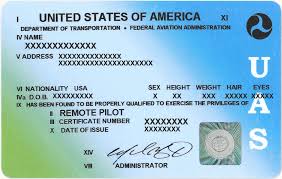
FAA Part 107 drone pilot license card next to organized UAS flight logs and operational history documentation

Part 107 recurrent training and knowledge testing requirements mean that staying current as a commercial drone pilot is an ongoing obligation — not a one-time event. And while the FAA doesn’t currently require you to submit flight logs at renewal, your operational history matters more than pilots often realize.

Why Your Flight History Matters at Renewal

Your flight records tell the story of your professional development. When you’re bidding on contracts with larger clients, responding to RFPs from enterprise accounts, or applying for waivers that require demonstrated operational experience, your documented flight history is your evidence.

“I’ve been flying professionally for five years” is a statement. A structured record of 400+ logged commercial missions is proof.

Waiver Applications and Operational Records

Many Part 107 waivers — beyond visual line of sight, operations over people, night operations — require applicants to demonstrate relevant operational experience. The FAA’s waiver application process asks you to describe your mitigations and experience. Pilots with clean, detailed operational records are better positioned to make that case.

What to Have Organized Before Your Knowledge Test

Use your recurrency period as a trigger to audit your records:

  • Are all past missions logged with complete data?
  • Are your airspace authorizations filed and accessible?
  • Are your aircraft maintenance and inspection records current?
  • Is your certificate information and medical (if applicable) up to date?

The Difference Between Pilots Who Scale and Those Who Don’t

The commercial UAS operators who grow their businesses from solo gigs into real operations share a common trait: they treat record-keeping as a core function, not an afterthought. Clean records enable audits, support insurance claims, back up waiver applications, and signal professionalism to enterprise clients.

FlightDeck was built for exactly this — structured, local, field-ready flight operations management. Try it free for 30 days.

Flying Commercial Drone Jobs in Rural America: What No One Tells You

DJI Mavic 3 Enterprise drone flying over a rural Midwest telecom tower site during a commercial aerial inspection

A significant portion of commercial UAS work happens in rural America — pipeline corridors through West Texas, agricultural parcels in the Midwest, transmission line inspections in Appalachia, construction monitoring on exurban development sites. These are some of the highest-value jobs available to commercial operators. They’re also where you learn fast that the tools built for urban drone work don’t always travel well.

Here’s what the rural commercial operations reality actually looks like.

Connectivity Is a Luxury

Urban pilots take LTE coverage for granted. Rural operations routinely involve driving 40 minutes from the nearest town to a site with zero cell signal. Whatever you need from the internet — maps, NOTAMs, client files, your operations software — needs to already be on your device before you leave the truck.

This means downloading airspace data in advance, having offline maps ready, and running software that doesn’t require a connection to function. A pre-departure connectivity checklist is as important as your preflight inspection.

The Logistics Are Real Work

Rural jobs often involve:

  • Multi-day mobilizations with overnight stays
  • Coordinating with landowners, site managers, and sometimes local law enforcement
  • Managing fuel, accommodations, and equipment transport
  • Flying in changing weather conditions with no easy abort option
  • Dealing with terrain that looks very different on a map than it does from the ground

This isn’t a two-hour shoot with a 20-minute drive. Rural commercial operations are logistical projects. Managing them well is a professional skill.

Weather Windows Are Everything

In an urban environment, a delayed shoot is an inconvenience. On a rural site two states away, a scrubbed day costs you a full mobilization. Reading weather accurately — not just the forecast, but the actual conditions at altitude — is a critical competency for rural operators.

Build buffer time into every rural job estimate. Clients who’ve worked with professional operators understand weather windows. Clients who haven’t will learn.

The Equipment Redundancy Requirement

On a rural job, equipment failure means the mission fails and you absorb the cost of remobilization. Redundancy isn’t optional at this level: backup aircraft, spare batteries, redundant props, a basic repair kit, and spare memory cards at minimum.

Documentation Still Matters — Maybe More

Rural and remote operations often involve more complex airspace considerations, more landowner coordination, and more logistical complexity than urban work. Clients who hire for rural ops tend to be larger, more sophisticated, and more likely to ask for detailed documentation.

Your operational records from rural jobs are among the most valuable you’ll produce. Log every flight, every coordination, every weather check.

FlightDeck was built for exactly this kind of operation — running without connectivity, logging what matters, and keeping your data intact whether you’re in downtown Dallas or a gravel road in the Panhandle.

Download the free 30-day trial.