
Using 5-Day Forecasts to Schedule Multi-Day Drone Campaigns

Scheduling a multi-day UAS campaign around weather isn’t just a forecasting problem — it’s a resource allocation problem. You have a finite number of flying days, sites spread across a geographic area, some with time-sensitive authorizations, and weather that doesn’t care about your project deadline.

The operators who manage this well aren’t just checking whether tomorrow looks good. They’re looking at the next five days across the full project scope and sequencing work to stay ahead of conditions.

Weather at Every Site, Not Just the Next One

FlightDeck pulls a 5-day weather forecast for every remaining unflown site in your project during the 3-Phase Update. That’s not a regional summary — it’s site-specific data pulled by GPS coordinates for each location.

What gets recorded for each site: current temperature in Fahrenheit, wind speed and gust in mph, wind direction as a cardinal bearing, cloud cover percentage, visibility, probability of precipitation, and rain or snow accumulation values. The forecast also captures 3-hour interval data for the operational window around midday, giving you a picture of conditions during the hours you’re actually likely to be flying.

Weather data is cached with a 4-hour freshness window. If you run the update again within four hours, FlightDeck skips the weather fetch for sites that are still current — the data doesn’t get stale, and you’re not burning API calls on information you already have.

Reading the Forecast Across a Region

When you’re looking at 50 remaining sites across a 200-mile project corridor, the weather picture is often uneven. One end of the corridor might be clear for three days while the other end has persistent wind and afternoon storm risk. The FlightDeck forecast data lets you sequence work toward the favorable end while the unfavorable end improves — rather than trying to push through marginal conditions because the schedule doesn’t account for the weather gradient.

The Forecast Scheduler map displays your remaining sites as color-coded pins by airspace authorization status, with the weather and scheduling data available in each pin’s popup. Green pins are scheduled. The other colors — dark red for COA-required sites, orange for sites needing 72-hour LAANC coordination, light blue for instant LAANC, light green for Class G — tell you the authorization picture at each location so you can prioritize work that’s ready to fly and use weather windows efficiently.

When Weather Forces a Delay

Sometimes the forecast isn’t marginal — a system rolls through and a week of planned work has to slide. FlightDeck’s Weather Delay tool handles this in one step: specify the number of days to add, and every unflown site’s forecast date moves forward.

The tool automatically skips sites with active LAANC authorizations. LAANC windows are time-bound, and blindly pushing the forecast date on an authorized site doesn’t extend the authorization — it creates a conflict. The Weather Delay tool protects those records so you can address them individually, while everything else shifts in one operation.

The Scheduling Edge

Weather-aware campaign scheduling isn’t about having better forecasts than your competitors. It’s about having the workflow to act on what the forecasts tell you — to sequence work intelligently, push delays cleanly, and show clients that schedule disruptions are being managed rather than simply absorbed.

The operators who consistently deliver projects on time in regions with volatile weather aren’t operating on luck. They’re making better daily decisions with better information.

Try FlightDeck free for 30 days.

Thunderstorm Season and Commercial Drone Ops: What the Forecast Apps Don’t Tell You

Thunderstorm season doesn’t just cancel individual flights. It scrambles project schedules across entire regions, sometimes for days at a time. A line of afternoon storms in the Gulf Coast or the Southeast can make an entire week’s worth of planned sites unflyable by early afternoon, and if you’re managing a multi-site project, the cascading schedule impact is its own problem to solve.

The apps that give you a good morning forecast — the ones that tell you whether today’s mission looks feasible — aren’t built to help you think about what to push, by how much, and which sites to protect. That’s a different problem.

The Weather Data Problem at Scale

On a single-site mission, weather is a go/no-go question. You check the forecast, you check conditions on arrival, you make a call.

On a 150-site tower inspection project, weather is a scheduling problem. You have sites in three states, some with LAANC authorizations that have fixed windows, some with COAs that have expiration dates, some with client deadlines that don’t move. When a weather system rolls through and makes a week of work unflyable, the question isn’t just “when can we fly?” — it’s “which sites do I push, by how much, and which ones do I have to protect?”

FlightDeck pulls a 5-day weather forecast for every remaining unflown site in your project from OpenWeatherMap — temperature, wind speed, gusts, wind direction, cloud cover, visibility, precipitation probability, and rain/snow accumulation. That’s not a single point check; it’s a weather picture across your entire project scope so you can see where the system is hitting hardest and plan around it.

The forecast data is cached with a 4-hour freshness window — if you run the update multiple times in a single day, FlightDeck won’t re-fetch data that’s still current, which keeps things fast and doesn’t burn through API calls unnecessarily.

The Weather Delay Tool

When a weather system forces a multi-day delay across your project, FlightDeck’s Weather Delay tool handles the rescheduling in one step. You specify the number of days to add, and FlightDeck pushes every unflown site’s forecast date forward by that amount.

The important detail: sites with LAANC authorizations on file are automatically skipped. LAANC authorization windows are time-specific — pushing a site’s forecast date forward doesn’t extend the authorization, it just creates a conflict between your schedule and your existing approval. The Weather Delay tool recognizes this and leaves LAANC-scheduled sites untouched so you can handle those manually.

Everything else — sites waiting to be scheduled, sites scheduled without LAANC — gets pushed in one operation. A week-long weather delay that would otherwise mean manually updating 80 rows takes about ten seconds.

Why “Mostly Favorable” Isn’t a Go

One of the harder lessons in commercial UAS operations is learning to be skeptical of forecasts that look mostly good. Thunderstorm season in particular produces convective activity that forms fast and moves unpredictably — a clear morning can deteriorate to dangerous conditions by early afternoon, and those conditions often develop faster than a weather app refreshes.

The practical protocol for thunderstorm season is to front-load your flying. Start earlier, plan to be wheels-down by early afternoon, and treat any forecast that shows afternoon thunderstorm probability above around 30% as a real risk to your timeline rather than a number to rationalize around.

FlightDeck’s weather forecast data gives you the picture for tomorrow’s sites before you finalize today’s plan. That’s the decision point that matters — not the morning of, when you’re already in the truck.

Managing weather delays well is one of the things that separates operators who keep projects on track from those who find themselves constantly rescheduling and explaining slippage to clients. The tools that help you do that quickly and accurately are worth having ready before the first line of storms arrives.

UAS Safety Culture: Building a Safety-First Operation as a Solo or Small Team

Safety culture is a term most commercial UAS pilots associate with large organizations — airlines, military units, corporate flight departments with dedicated safety officers and formal SMS programs. It sounds like something that doesn’t apply to the solo Part 107 operator flying inspection contracts in three states.

That’s a misconception that has ended more than a few commercial UAS careers.

Safety culture isn’t a program. It’s a set of habits, standards, and values that shape every operational decision you make — from how you conduct a pre-flight inspection to whether you fly in marginal conditions because the schedule says you should. And it matters for solo operators and small teams as much as it does for anyone else.

What Safety Culture Actually Means

A genuine safety culture has three characteristics:

Reported. When something goes wrong — or almost goes wrong — it gets documented and discussed, not buried. In an organization, this means a non-punitive reporting system. As a solo operator, it means writing up your own close calls honestly and using them to improve your procedures.

Learned. Information from incidents — yours and others’ — feeds back into how you operate. The UAS industry generates incident data through ASRS reports, FAA enforcement records, and pilot communities. Operators who read and learn from that data don’t repeat the same mistakes.

Consistent. Standards are applied every time, not just when conditions make it easy. A pre-flight checklist completed on every flight — including the short, familiar one you’ve done 50 times before — is a safety culture behavior. Skipping it because “you know this site” is not.

The Hidden Cost of Low Safety Standards

Beyond the obvious risk of incidents, low safety standards carry a business cost that isn’t always visible until it matters. Enterprise clients — utilities, carriers, construction companies, insurance firms — increasingly evaluate UAS vendors on safety credentials before awarding contracts. They ask for operations manuals, safety records, incident history, and evidence of structured operational procedures.

A pilot who can demonstrate consistent, documented safe operations commands better rates and more stable enterprise contracts than one who can’t. Safety culture is a competitive advantage, not just a moral obligation.

Practical Safety Culture Habits for Solo Operators

Pre-flight, every time. No exceptions. No abbreviated versions for familiar sites. The checklist exists because familiar sites are where complacency lives.

Personal weather minimums, written down. Limits you’ve committed to in advance are the ones you’ll actually hold to when conditions are marginal and pressure to fly is high.

An honest post-flight debrief. Even a two-minute mental review — what went as planned, what didn’t, what would you change — builds the pattern recognition that makes you a safer operator over time. Write it down when something is worth noting.

Equipment that’s ready to fly before it needs to fly. Battery health checked regularly. Props inspected after every flight. Firmware current. Maintenance intervals tracked. You find equipment issues during maintenance, not during a mission.

Currency. If you haven’t flown in a while, practice before taking a client job. Motor skills and pattern recognition erode. Solo proficiency flights aren’t wasted time — they’re maintenance on your most important piece of equipment, which is you.

How FlightDeck Supports a Safety Culture

Safety culture requires documentation — the evidence that standards are being applied consistently. FlightDeck’s structured logging captures pre-flight completion, conditions, authorization status, anomalies, and post-flight notes in a local database attached to every mission record.

The Drone Maintenance Log tracks maintenance events, battery cycles, and repair history by aircraft serial number — exportable for insurance documentation and compliance records. The Airspace Checker ensures every site gets a proper authorization review before you fly, not after. The compliance documentation tools build the operational paper trail that enterprise clients and insurers require.

Safety culture produces the data. FlightDeck captures it.

Download the free 30-day trial and start building the operational record that proves your safety standards to clients, insurers, and the FAA — one documented flight at a time.

Nearest Airport, Nearest Hospital: The Situational Awareness Data Every Pre-Flight Needs

FlightDeck software displaying airport and hospital proximity data on a map for a commercial UAS job site

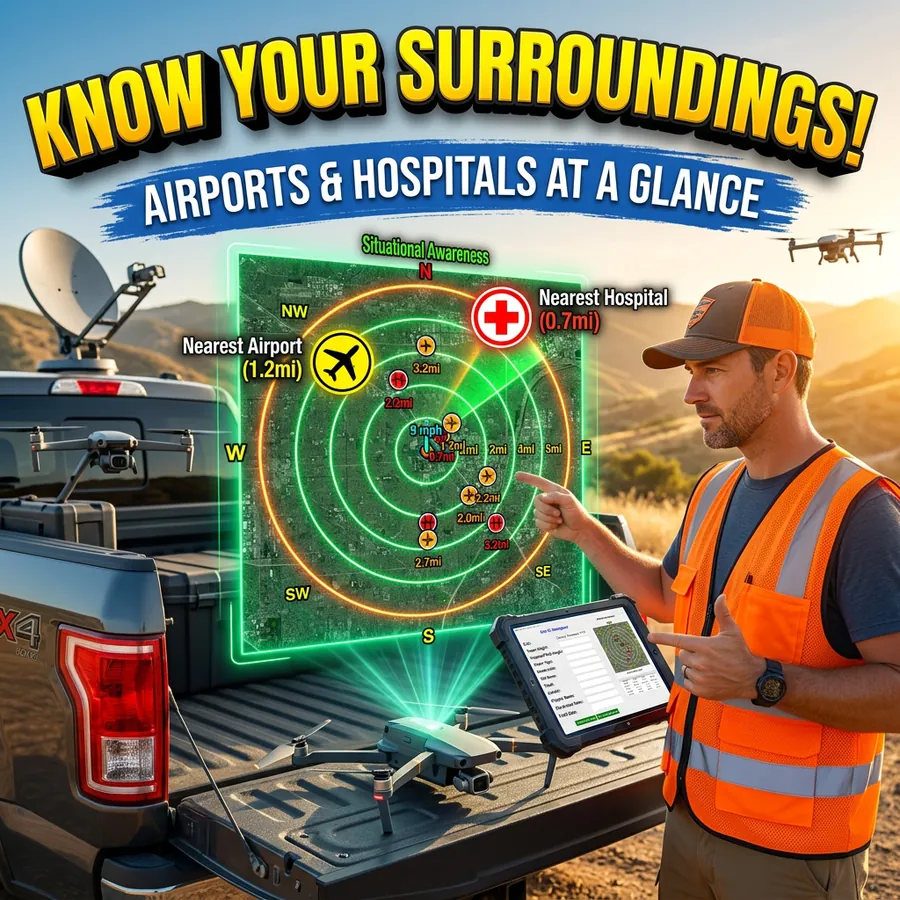
Most Part 107 pilots know their airspace classification before wheels up. Fewer know the distance and bearing to the nearest airport — or the nearest hospital. Both numbers matter, and both require more than a quick glance at a map to calculate accurately for a hundred sites at once.

FlightDeck calculates and records both automatically for every site in your project, stored directly in your working data file so the information is always there when you need it.

Why Distance to the Nearest Airport Matters

Airspace classification tells you whether you need authorization. Distance and bearing to the airport gives you the operational picture — which direction manned traffic is likely approaching from, how close you are to approach and departure corridors, and what situational awareness your crew needs during the operation.

It also matters for your documentation. COA narratives, pre-flight checklists, and formal risk assessments typically require nearest airport information. Having it automatically populated across your entire project means you’re not manually looking up each site the night before.

FlightDeck stores two entries for each site: the nearest airport and the second-nearest airport. Each entry includes the airport name, ICAO identifier, airport type, airspace class, distance in nautical miles, and cardinal bearing. All of this is calculated using Haversine geometry — the same spherical distance formula used in aviation navigation — applied against a locally stored airport database.

Why Distance to the Nearest Hospital Matters

UAS incident response planning requires knowing where the nearest medical facility is. For inspection work in rural corridors — tower lines, pipelines, agricultural parcels — that answer isn’t always obvious, and it changes with every site.

FlightDeck records the nearest hospital and second-nearest hospital for each site, with the same distance and bearing format as the airport data. On a 200-site project spread across three states, that’s 200 hospital lookups that don’t require manual research.

This data supports your pre-flight risk assessment and is available in the same row as your airspace classification, weather, and authorization status — all in one place when you’re planning the next day’s work.

How It’s Calculated

All distance and bearing calculations use Haversine geometry applied to latitude and longitude coordinates from your site list. The airport and hospital databases are stored locally, so the lookup runs whether or not you have an internet connection.

When a site already has nearest-airport data on file, FlightDeck reads from a SituationalAwareness cache to avoid redundant calculations on re-runs. New sites and any sites missing the data are calculated fresh during the 3-phase update.

The bearing is expressed as a cardinal direction — N, NE, SW, and so on — alongside the nautical mile distance, which is what you want for communicating airspace proximity in plain language.

What This Looks Like in Practice

Before a week-long tower inspection campaign, you run the FlightDeck 3-Phase Update. By the time it finishes, every site in your project has its nearest airport and hospital populated — the distance, the direction, and the identifier. Your pre-flight checklist for each site has the information without a separate research step.

When a client or project manager asks how close Site 47 is to the nearest controlled field, you have the answer in your spreadsheet, not from memory or a map lookup.

When you’re writing a COA narrative for a controlled-airspace site, the nearest airport data is already available. When you’re doing site-by-site risk assessment, hospital proximity is part of the same dataset.

The situational awareness data FlightDeck calculates is the kind of information that takes five minutes per site to look up manually — and zero minutes per site when it’s done automatically across your entire project.

FlightDeck’s situational awareness calculations are included in every license tier. Try it free for 30 days.

UAS Incident Reporting: What to Do When Something Goes Wrong

Commercial drone pilot documenting a UAS incident with notes and photos at the scene of an unexpected drone landing

No commercial UAS pilot plans for an incident. But the ones who’ve thought through exactly what to do before one happens are the ones who handle them professionally when they occur — protecting themselves legally, maintaining client confidence, and contributing to the industry’s safety record.

Here’s what you need to know about UAS incident reporting as a commercial Part 107 operator.

What Triggers a Reporting Requirement

Under 49 CFR §830, the NTSB requires notification when a UAS operation results in:

  • Serious injury to any person (hospitalization required)
  • Loss of consciousness of any person
  • Property damage exceeding $500 (to property other than the aircraft itself)

Additionally, the FAA can request information and records from certificate holders at any time. Under Part 107, you’re required to make your aircraft available for inspection and to cooperate with FAA investigations.

Many incidents that don’t trigger mandatory NTSB reporting are still worth documenting formally — airspace deviations, close calls with manned aircraft, equipment malfunctions, or any operation that didn’t go as planned.

Immediate Response: The First 60 Minutes

Secure the scene. If the aircraft is down in a manner that poses ongoing risk — near people, traffic, or energized lines — manage that hazard first before doing anything else.

Document everything before it changes. Photograph the aircraft position, any damaged property, the launch and landing zone, and your equipment setup. Video the scene. Note the time, GPS coordinates, weather conditions, and who was present. Do this before anything is moved or removed.

Preserve flight data. Don’t clear logs. Don’t reset the aircraft. The flight controller log, video footage, and any telemetry data may be relevant to the investigation. Preserve it.

Notify your insurer. Most commercial UAS policies require prompt notification of potential claims. Don’t wait to see if a claim materializes — notify early.

Do not make admissions. Speak factually about what happened. Don’t speculate about cause or accept liability before facts are established. This applies in conversation with clients, bystanders, and especially with any responding authority.

NTSB Reporting Process

If the incident meets the reporting threshold, notify the NTSB as soon as practicable and no later than two days after the accident. Notification can be made through the NTSB’s online reporting form or by phone. A full written report may be required within 10 days.

Keep a copy of everything submitted. If the FAA opens a parallel investigation, your documentation and the timeline of your actions matter.

The Professional Response to Non-Reportable Incidents

For incidents that don’t trigger mandatory reporting — a hard landing, a minor equipment malfunction, an airspace confusion — the professional response is still documentation and analysis.

Write an internal incident report: what happened, what the chain of events was, what the contributing factors were, and what procedural or equipment changes you’re making in response. File it. Reference it in future planning.

Pilots who document and learn from their close calls have far fewer of them over time. The ones who don’t tend to repeat the same errors until one of them becomes a reportable event.

Maintaining the Record

Your operational history — the complete record of flights, conditions, authorizations, and incidents — is your professional evidence file. FlightDeck’s SQL-backed flight logging captures 87+ data points per mission in a local database that’s always there when you need it.

When an insurer, a client, or the FAA asks what happened and when, you pull a report. You don’t reconstruct from memory.

Download the free 30-day trial and start building the operational record that protects you when something doesn’t go according to plan.

Reading Weather for Commercial Drone Operations: Beyond the Forecast

Commercial drone pilot reading a METAR weather report on a laptop before a UAS flight operation at a tower site

Weather cancels more commercial UAS missions than any other factor. It also causes more incidents than pilots acknowledge — because many of those incidents start with a pilot who looked at a “mostly favorable” forecast and decided to fly, only to encounter conditions in the field that the forecast didn’t predict accurately at their operating altitude and location.

Reading weather for UAS operations requires more than checking a phone app. Here’s a practical framework for commercial operators who need to make defensible, repeatable weather decisions.

What a Consumer Forecast Doesn’t Tell You

Standard weather apps report surface conditions at the nearest reporting station, which may be miles from your site and at a different elevation. They aggregate conditions over broad areas. They don’t tell you:

  • Wind speed and direction at 200, 300, or 400 ft AGL at your specific site
  • Mechanical turbulence generated by buildings, terrain, or obstacles at your operating altitude
  • Thermal activity that varies by surface type and time of day
  • Localized precipitation or fog in valleys and low-lying areas
  • Wind gradient — how speed and direction change with altitude

A ground-level reading of 8 knots can be 18 knots at 300 ft AGL in certain terrain and atmospheric conditions. Your aircraft is rated for a wind limit — but that limit applies to the wind it’s actually experiencing, not the wind at the surface a mile away.

Better Weather Sources for UAS Operations

Aviation weather services. aviationweather.gov provides METARs, TAFs, winds aloft forecasts, and PIREPs from pilots who’ve actually been in the airspace. Winds aloft forecasts (FB winds) are specifically useful for predicting conditions at UAS operating altitudes.

UAV-specific weather services. Tools like UAV Forecast, Windy, and dedicated drone weather apps aggregate multiple weather models and present them in pilot-friendly formats. FlightDeck integrates with OpenWeatherMap to pull current conditions and 5-day forecasts for every site in your project automatically.

On-site observation. Arrive early. Watch the site for 10–15 minutes before launch. Watch smoke, dust, flags, tree movement, and cloud base. The site tells you things no forecast does.

Setting Personal Minimums

Part 107 doesn’t specify weather minimums for most operations (beyond 3 SM visibility and cloud clearance requirements). That means you need to set your own. Personal minimums are specific, pre-established limits that define the conditions under which you’ll fly.

For a standard multi-rotor payload operation, a conservative personal minimums set might look like:

  • Surface wind: below 15 kts sustained, gusts below 20 kts
  • Visibility: 5 SM or greater
  • Cloud ceiling: 1,000 ft AGL minimum, 1,500 ft preferred
  • No precipitation of any type
  • Temperature: above manufacturer minimum operating temperature
  • No nearby lightning within 10 SM

These are examples. Your limits should reflect your platform’s actual tested performance, your payload, your site type, and your operational risk tolerance. Write them down. Apply them consistently. Don’t negotiate with yourself on site.

Weather Delays and Rescheduling

Professional clients understand weather holds. What they don’t understand is a pilot who didn’t communicate early. If weather is trending unfavorable, notify your client 24 hours in advance — not the morning of, and certainly not after you’ve driven to the site.

For teams managing large site lists, tracking weather across dozens of locations manually is untenable. FlightDeck’s Weather Delay Tool lets you advance all un-flown site forecast dates by a specified number of days with a single click — automatically skipping LAANC-authorized sites that have fixed authorization windows.

Every remaining site in your project gets a color-coded 5-day weather forecast automatically: green for clear, red for rain, blue for snow, gray for overcast. You see your entire project’s weather picture in one view, every morning before deployment.

Download the free 30-day trial and bring weather intelligence into your daily operations workflow.

The UAS Pilot’s Go/No-Go Decision: A Systematic Pre-Flight Risk Framework

The most dangerous moment in any commercial UAS operation isn’t in the air. It’s on the ground, when conditions are marginal, a client is waiting, you drove two hours to get here, and the temptation to press on is strong.

This is where most UAS incidents originate — not from technical failure, but from a go/no-go decision made under pressure, without a structured framework, by a pilot who overrode their own judgment because the external pressure to fly was stronger than the internal signal to stop.

A systematic pre-flight risk assessment changes that dynamic. The decision gets made before the pressure builds.

Why Structure Beats Judgment Under Pressure

Human judgment degrades under stress and workload. When you’re on a site with a client watching, equipment staged, and weather that’s “probably fine,” your risk assessment will be optimistic. This is called plan continuation bias — the tendency to continue a plan even when new information suggests you should stop.

A structured framework removes the decision from the moment of pressure. You defined your limits in advance. You either meet them or you don’t. The checklist decides, not your mood at the time.

The Five-Factor Risk Assessment

Before every mission, assess these five factors against pre-established thresholds:

1. Weather
Define specific limits — not vague ones. Not “acceptable conditions,” but: wind gusts below 15 kts, visibility above 3 SM, no precipitation, cloud ceiling above 500 ft AGL for the planned operating altitude. These are examples — your limits should match your platform and payload. Write them down. Apply them every time.

2. Airspace & Authorization
Is your airspace authorization confirmed and current? Has a TFR been issued since you last checked? Are there any active SUA restrictions overlapping your site? Every one of these is a binary check. If the answer to any is no or unknown, you’re not ready to fly.

3. Aircraft & Equipment
Is the aircraft airworthy? When was the last inspection? Battery health within limits? Props inspected for damage or delamination? Payload mounted and confirmed secure? This isn’t a mental walkthrough — it’s a checklist item by item.

4. Site & Hazards
Have you physically surveyed the launch and landing zone? Are there obstacles, wires, or people not visible on satellite imagery? Is the site consistent with your briefing, or has something changed? Surface conditions for multi-rotor launch?

5. Pilot Readiness
This one gets skipped. Don’t skip it. Are you current on your Part 107 knowledge? Are you rested? Are you under medication, stress, or any physical condition that affects your alertness? IMSAFE — Illness, Medication, Stress, Alcohol, Fatigue, Emotion — applies to UAS pilots just as it does to manned aviators.

Quantifying Risk: The Risk Score Approach

For operations where individual factors are marginal but not individually disqualifying, a numerical risk score helps. Assign each factor a score from 1–5 based on severity. Set a mission total threshold — if the combined score exceeds it, the mission is a no-go regardless of any individual factor being acceptable.

This prevents “death by a thousand cuts” — where five factors each rated “slightly elevated” combine into a mission that’s actually high risk.

Documenting the Decision

Log your go/no-go decision and the risk assessment that supported it. If you go: what were the conditions you accepted? If you scrub: what was the specific trigger? This documentation serves multiple purposes — it supports insurance claims, demonstrates professionalism to clients, and builds your own operational pattern recognition over time.

FlightDeck’s pre-flight logging captures conditions, authorization status, and pre-flight notes in the same record as your flight data. Your risk assessment and your flight outcome live together — which is exactly how you learn from your own operation.

Download the free 30-day trial and start building the structured pre-flight discipline that keeps your operation safe and your record clean.

Crew Resource Management for UAS Pilots: Lessons from Manned Aviation

Crew Resource Management — CRM — is one of the most important concepts in manned aviation safety. It emerged from accident investigations that revealed most crashes weren’t caused by mechanical failure or bad weather. They were caused by human factors: poor communication, unchallenged errors, fixation on one problem while missing another, and captains who didn’t listen to co-pilots who saw the problem first.

Commercial UAS pilots can learn a great deal from CRM, even when flying solo. And for multi-pilot operations with a visual observer, crew coordinator, or remote pilot team, CRM isn’t optional — it’s the difference between a safe operation and an incident waiting to happen.

What CRM Actually Is

CRM is the effective use of all available resources — people, information, equipment — to achieve safe and efficient flight operations. It encompasses:

  • Situational awareness — knowing where you are, what’s around you, and what’s coming next
  • Decision-making — structured go/no-go processes rather than gut feel under pressure
  • Communication — clear, unambiguous information sharing between everyone on the operation
  • Workload management — distributing tasks so no one person is saturated while others are idle
  • Error management — catching mistakes before they become incidents, and managing them when they occur

CRM for the Solo UAS Pilot

Even flying solo, CRM principles apply. You are still managing multiple information streams simultaneously: aircraft telemetry, airspace, weather, battery state, site hazards, and client communication. Saturation of any one of these leads to the others being ignored.

Solo CRM practices that matter most:

Checklists over memory. Standardized pre-flight, in-flight, and post-flight checklists exist because human memory is unreliable under workload. Use them every time, without exception. Skipping a checklist because “you always do it this way” is exactly when you miss something.

Decision points set in advance. Establish go/no-go criteria before you arrive on site. Wind limits, visibility minimums, battery thresholds for return. Decisions made on the ground before pressure builds are better decisions than ones made while the aircraft is airborne and conditions are deteriorating.

Self-briefing. Talk yourself through the mission before launch. Hazards, contingencies, abort criteria. Saying it out loud — even alone — forces a completeness that mental review doesn’t.

CRM for Multi-Pilot Operations

When you add a visual observer, second pilot, or ground crew, the communication layer becomes critical. Accidents in multi-person UAS operations often involve someone who saw the problem but didn’t speak up, or did speak up and wasn’t heard.

Briefings are mandatory. Every person on the operation needs to know the mission profile, their specific role, the communication protocol, and the abort criteria before any aircraft is powered on.

Standard phraseology. “Traffic” means something specific. “Clear” means something specific. Establish shared language for your operation and use it consistently. Ambiguous communication in a fast-moving situation produces the wrong action.

Challenge and response. Critical actions — launch, altitude changes, approach to obstacles — should be called and confirmed. “Launching” / “Clear to launch.” Not assumed.

Authority gradient awareness. In manned aviation, junior crew members sometimes fail to challenge a captain’s bad decision. In UAS operations, a visual observer may not challenge a pilot who’s pressing on into unsafe conditions. Build a culture where every person on the team has both the authority and the expectation to call a stop when something isn’t right.

Managing Automation Bias

Modern UAS platforms are highly automated — return-to-home, obstacle avoidance, altitude hold. This is a safety asset, but it creates its own risk: automation bias, the tendency to trust automated systems without monitoring them critically.

Return-to-home doesn’t know about the crane that moved since you set it. Obstacle avoidance doesn’t see thin wires. Altitude hold doesn’t account for GPS drift near metal structures. Know your automation, know its limits, and never assume it’s covering something it may not be.

Logging as a CRM Tool

One underappreciated CRM function is the debrief. After every mission — especially ones where anything went differently than planned — document what happened, what the decision points were, and what you’d do differently. Over time, this builds a personal database of operational experience that improves every future flight.

FlightDeck’s structured flight logging captures the data that makes debriefs meaningful: conditions, authorization status, anomalies, post-flight notes. The data that helps you learn is only useful if it’s captured consistently.

Download the free 30-day trial and build the operational discipline that CRM demands into every mission from day one.